
🇨🇳 Domestic innovation (Xinchuang) ready ⚡ Lightweight · Fast startup 🤖 Built-in AI assistant 🔒 Local-first · On-premise 🆓 Free to use 🚀 v0.8.0 just released

SJ-Mail
Your local smart inbox

A lightweight, AI-powered email client built local-first — encrypted data, on-premise deployment, and the classic desktop mail experience, back.

A lightweight Windows / macOS desktop and Android mobile client made for heavy email users — emails and credentials are encrypted and stored locally, and the built-in SJ-AI assistant actually does mail work: search, summarize, draft, translate, and analyze attachments, with human approval for every sensitive action.

SJ-Mail · Inbox
Accounts
📥 Inbox 12
📤 Sent
📝 Drafts
⭐ Starred
🗄 Project archive
🗑 Trash
Zhang (Manager)
Q3 contract review — please confirm ASAP
Finance Dept.
August expense claim deadline reminder
IT Support
System maintenance notice
Q3 contract review — please confirm ASAP
Zhang (Manager) · Today 09:32
✨ SJ-AI summary: confirm the payment terms in clause 5…
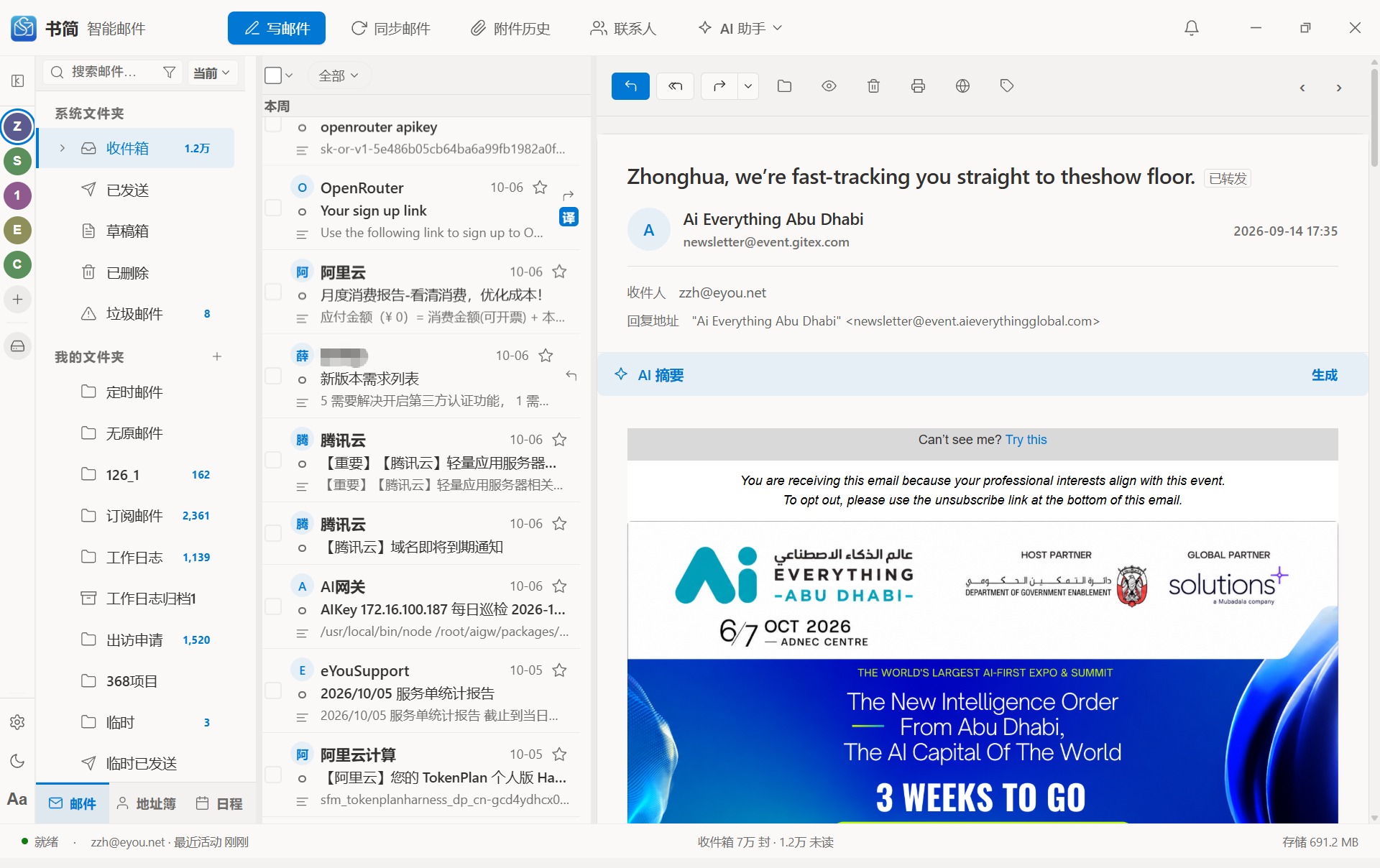
SJ-Mail v0.8.0 main window: classic three-pane layout with the AI reading assistant

SJ-Mail v0.8.0 real main window — the classic three-pane layout, reorganized mail area, and built-in AI reading assistant

SJ-Mail is a local smart inbox built for heavy email users — secure, effortless, and on your side.
01 / Data sovereignty

Your data stays yours

Emails and account credentials are encrypted and stored locally — no cloud sync required. Read and search downloaded mail offline, and keep long-term local archives.

02 / AI that works

AI that actually does mail work

Not just chat — it searches mail, summarizes folders, drafts replies, translates content, and analyzes attachments. A daily briefing is generated every day (or hourly); since v0.6.0, contact and relationship profiles feed into AI writing context, so it knows you and your counterpart better.

03 / Enterprise-grade

Enterprise-grade compatibility

Compatible with the mail systems of multiple central SOEs, state-owned enterprises, and financial institutions; the full AI solution deploys on-premise against company-owned LLMs — data never leaves. Since v0.6.0, profile analysis incorporates enterprise org-structure context, so AI understands people in a corporate setting.

Core Value

Why choose SJ-Mail

Process large volumes of mail efficiently and securely — local-first — with a built-in AI assistant that dramatically improves reading, writing, and management.

🛡

Local control, data goes nowhere

Mail is downloaded to a local SQLite database; account passwords are encrypted with AES-256-GCM. Local archiving keeps mail long after it leaves the server — readable and searchable offline.

🤖

AI that truly understands email

AI reads the local mail index directly and can answer "which emails about the contract came in last week?"; drafting is context-aware, and translation preserves HTML formatting. Since v0.6.0, AI writing brings in your relationship profile with the recipient — their role, your shared history — for more tactful replies, and matches your own writing style.

🏢

Enterprise compatibility & governance

Compatible with the mail systems of multiple central SOEs, state-owned enterprises, and financial institutions; the full AI solution deploys on-premise against company-owned LLMs with unified signatures, filter rules, and org structure — data never leaves. Since v0.6.0, AI profiles automatically incorporate enterprise directory information (department / title) for corporate context.

🖱

The desktop experience you know

The classic three-pane layout, a resident system tray with instant new-mail notifications, and independent compose windows for true multi-window work.

Mail Core

Complete, effortless mail capabilities

A modern rebuild of the classic desktop mail experience — the three-pane layout keeps the learning curve low and everything within reach.

👥

Multi-account management

Add multiple mailboxes (IMAP/SMTP/CAPI), each with its own folder tree, signatures, and filter rules, all syncing in the background.

🗂

Folders & unread badges

Inbox, sent, drafts, and custom folders, with live unread badges wired into the notification center.

📖

Three-pane reader

HTML is sanitized via DOMParser before rendering; preview and download attachments; reply/forward/move/archive in one click.

🔍

Current-folder & global search

Quick search within the current folder, cross-folder global search (with source labels), and suggestions based on your history.

🗄

Local archiving

Archive mail from the server to local storage — keep the original structure, organize by year/month, or use custom directories, with a second confirmation and progress display before archiving.

⚙

Visual filter rules

Combine multiple conditions (sender, subject, attachments, etc.); actions include move, flag, delete, and forward; rule priorities are adjustable, with a built-in test run.

SJ-AI · Powered by v3.14 · sj-track v1.7

A built-in AI assistant, not a bolt-on

Driven by our self-developed SJ-AI protocol (currently v3.14) with a "server orchestration + client execution" architecture. AI accesses local mail directly and truly "operates email" inside the local security boundary.

💬

AI conversation

Query mail, contacts, and schedules in natural language; continuous context-aware conversations with local history. New sessions open with a "what can I do for you" guide.

✍

AI writing

One-click reply drafting based on the original thread, with continuation, polishing, and formalization; describe what you want in Chinese to generate English / Japanese / Korean mail.

🌐

AI translation

Translate whole emails while preserving HTML layout; large mails are translated chunk-by-chunk in streaming fashion, across Chinese / English / Japanese / Korean.

📋

AI summarization

Extract key points, to-dos, and critical times from a single message; batch-summarize by folder, recent N messages, or date range; the daily briefing can be re-read hourly and customized by type.

👤

Contact & relationship profiles

Four profile types (user / enterprise / contact / relationship) produced in one analysis; enterprise contacts incorporate org-structure context; profiles feed AI writing so it understands both sides.

⭐

VIP contacts: AI guards your key relationships

Tag clients and leaders as VIP contacts: their inbound mail is automatically recognized and prioritized; AI builds and refreshes relationship profiles on a schedule; before you send, AI checks spelling, attachments, and sensitive information — important mail never ships with low-level mistakes.

🖼

AI attachment analysis

Hand image attachments to multimodal models (scans, invoices, screenshots, design drafts); images are read locally as data URIs.

🔐

Local security boundary + tool-call approval

AI may suggest, but it cannot perform high-risk actions on its own — every sensitive action requires your click to confirm, and approvals time out after 5 minutes (treated as declined), guarding against misoperation and prompt injection.

Send email Delete email Mark read / star Save contact Send draft
Security & Privacy

Data sovereignty, security under control

Local-first + local encryption + local approval; inheriting the security DNA of eYou's two decades serving central SOEs and governments, with user information protection as the bottom line.

🔑

Local encryption

Account passwords and AI keys are encrypted with AES-256-GCM into a local SQLite database, with keys backed by the OS keyring.

🧼

Safe rendering

Email HTML is sanitized via DOMParser before rendering, blocking XSS and phishing scripts.

🚧

AI security boundary

Sensitive actions always require user approval; tool definitions are provided by the client, and the server stores no extra schema — a smaller attack surface.

📑

Audit & logs

Operation logs rotate daily in the user data directory; email content is never uploaded to remote logging.

Shujian AI is a wholly-owned subsidiary of eYou, inheriting its two decades of security DNA serving central enterprises, state-owned companies, and governments, with the protection of user and customer information as its natural bottom line; AI only analyzes within the local security boundary and sensitive operations require manual confirmation — ideal for privacy-sensitive professionals such as lawyers, accountants, consultants, and government / SOE staff; the core mail engine and AI framework are self-developed with independent intellectual property, keeping key modules under our own control.
Enterprise Ready

Upgrade existing mail systems · Multi-brand compatible · On-premise AI deployment

The enterprise solution lands on three points: add AI capabilities on top of your existing mail system without replacing it; compatible with multiple mail system brands; and deploy the entire AI solution inside the corporate intranet — data never leaves.

Point 1 · Upgrade existing mail systems — no replacement needed

Keep your existing mail system, accounts, and historical mail; the client + AI server layer plugs in on top — employees are productive from day one

  • No replacement: your existing mail systems and servers stay untouched — a layered deployment completes the AI upgrade with zero disruption to daily work.
  • Multi-brand compatible: native eYou CAPI access to eYou-platform systems; any mail system brand supporting standard IMAP/SMTP can be connected.
  • eYou CAPI protocol: native access to enterprise mail systems built on the eYou platform — folders, search, sending, contacts, and org structure.
  • Domain pre-recognition: enter a company mailbox and the protocol and server are matched automatically — onboarding is just "enter email and password".
  • Engineering-grade robustness: JWT signatures, device-key rotation, and HTTP retries for large-scale concurrency and high availability.

Point 2 · Full on-premise AI deployment

sj-ai-server deploys entirely inside the enterprise intranet, connecting to company-owned LLMs — mail data never touches the public network

  • Private server side: sj-ai-server runs in the enterprise intranet / domestic-IT environment; clients point to the intranet address and AI calls stay in-network.
  • Bring your own LLMs: supports open-source / domestic model backends such as Qwen, DeepSeek, and ChatGLM — free to choose by compute and compliance needs.
  • Data never leaks: mail bodies, attachments, and profiles are processed inside the intranet — never sent out, never used for external model training.
  • Compliance-aligned: meets MLPS 2.0, cryptography evaluation, and cross-border data regulations, with domestic-platform adaptations.
Trusted by multiple central-SOEs, state-owned enterprises, and financial institutions

Connected via eYou CAPI / IMAP, covering energy, finance, and power industries

Contact sales for an on-premise plan →
Use Cases

Real scenarios, instant results

From the morning briefing to enterprise rollouts, SJ-Mail fits every email workflow.

Scenario 01

Morning daily briefing

Enterprise manager · 50+ emails a day

Open your computer at 10am — the briefing card has already summarized overnight and morning mail by section; click a key point to jump straight to the source email, and translate English mail in passing.

Saves 15–20 minutes of reading mail one by one
Scenario 02

Rapid customer replies

Foreign-trade salesperson · cross-language communication

Receive an English price inquiry, hit "AI Write → Reply" for a professional draft, adjust pricing and delivery dates, and send after a final AI-confirmed check.

3× faster English replies
Scenario 03

Project mail archiving

Project manager · compliance retention

Search all project correspondence, select, and archive locally with the original folder structure intact; free up server space while keeping a permanent local record.

Compliant, controllable, long-term archiving
Scenario 04

Cross-language team collaboration

Administrative assistant at a multinational

Receive a Japanese meeting notice — AI translates the whole email with formatting intact, summarizes time, place, and agenda, and creates a calendar event in one click.

Fewer missed details across languages
Scenario 05

Centralized multi-account management

Freelancer · 3–5 mailboxes

Bring Gmail, corporate mail, and QQ Mail together in SJ-Mail, archive by project into local folders, and stop switching between webmail tabs.

One client for every mailbox
Scenario 06

Enterprise-wide rollout

Enterprise IT lead · compliance needs

Connect to the corporate mail service via CAPI, push signature templates centrally, auto-sync the org structure on employee login, and meet compliance with sensitive-action approvals.

Unified entry · lower maintenance cost
Scenario 07

Nurturing key customer relationships

Sales manager · key-account care

Open a customer's contact details and the AI profile card shows their role, closeness with you, recent joint projects, and shared topics; when drafting a reply, AI already knows this context and keeps the right tone.

From "AI reads one email" to "AI understands the relationship"
Scenario 08

Sending a flawless email to a key client

Sales manager · key-account follow-up (new in v0.8.0)

Tag a key client as a VIP contact — customer; an AI profile is built automatically. Before the quote goes out, the pre-send AI gate checks spelling, attachments, and sensitive information; after sending, read tracking tells you the perfect moment to follow up; their replies arrive pre-tagged and prioritized.

Zero-tolerance for send errors · precise timing · a relationship on file
Comparison

Compared with mainstream email clients

Local data sovereignty + built-in AI + enterprise CAPI — SJ-Mail stands alone on the dimensions that matter.

Dimension Outlook A mainstream client Gmail Web Spark SJ-Mail
Local storagePartialYesNoNoYes
Offline readingYesYesLimitedLimitedYes
Multi-accountStrongMediumMediumStrongStrong
AI integrationCloudNoneCloudCloudLocal security boundary
Contact & relationship profilesNone or cloudNoneNone or cloudNone or cloudIn the local security boundary, with org structure & writing context
VIP contacts & pre-send checksNoneNoneNoneNoneRelationship tagging / inbound recognition / auto profiling / pre-send AI checks
Large-list performanceMediumWeakMediumMediumVirtual scrolling, thousands of emails smooth
Data sovereigntyMicrosoft cloudLocalGoogle cloudCloudLocal-first
Enterprise CAPINoNoNoNoYes
Chinese experienceMediumStrongMediumMediumStrong
Startup speedSlowFastBrowser-dependentFairly fastFast
What's New · v0.8.0

VIP contacts, Contacts Hub redesign, large-list virtualization, all-new brand

v0.8.0 extends AI from "reading mail" to "maintaining relationships for you": tag who's important, recognize their inbound mail automatically, keep profiles fresh on a schedule, and gate outgoing mail behind AI checks — alongside a standalone Contacts Hub, buttery-smooth scrolling over thousands of emails, four rounds of design-review polish, and the all-new second-generation brand icons.

⭐ New · v0.8.0

VIP (important) contacts

A lightweight CRM built into the mail client: tag contacts as client / leader / colleague / family from contact details, org directory, or the reading pane; their inbound mail is auto-flagged on arrival; before you send, AI checks spelling, attachments, and sensitive information (tone judged by relationship), fail can block, offline local rules apply, and nothing silently passes.

  • Three entry points with automatic dedup by email address
  • Inbound recognition: VIP mail is flagged on arrival and prioritized
  • Marking a contact auto-builds an AI profile, refreshed on a schedule (quota-aware, 429 backoff, globally toggleable)
  • Pre-send three-dimension AI check (protocol v3.14) with a "remember my choice" option
⭐
Mr. Li · VIP contact
Relationship: client
AI relationship profile (auto-refreshed)
Key project: Q3 contract 12 emails / 30 days
🛡 Pre-send check: spelling ✓ attachment ✓ sensitive info ✓
🗂 New · v0.8.0

Contacts Hub redesign

Contact management becomes a standalone-window hub (with a scoped read-only embedded view in the main window): org directory and personal address book in account sections, three-way concurrent global search across local + org + VIP (VIP pinned on top), cross-account address-book aggregation with dedup, and group management.

  • Standalone window for full management + scoped read-only in main window
  • Three-way concurrent global search, VIP results pinned ⭐, race-condition guarded
  • Unified address book (local namespace) deduplicated by email across accounts
  • Group navigation + member management + column-width drag; "pick from directory" prefill for new contacts
🔍 Global search
⭐ Mr. Li (VIP contact)
Xiaoya Wang (local address book)
Org directory
Personal · deduped
⚡ New · v0.8.0

Large-list virtualization

Folders with thousands of emails no longer stutter: the mail list runs on virtual scrolling (a 4,351-row DOM shrinks to the viewport subset), date group headers stick to the top, j/k keyboard navigation follows across groups, and column-width dragging is rAF-throttled — scroll frame rate is decoupled from mail count.

  • Shared VirtualList wrapper with a full-render fallback switch
  • Contact list virtualization in list view
  • Single sticky date-group header + rAF throttling
  • Selection follows scrolling across groups; no jumping back after sync
📥 Case correspondence · 4,351 emails
Today
Contract revision v3 …
Supplementary terms confirmation …
Only viewport rows rendered · no dropped frames
v0.8.0 also lands: all P1-P3 issues from four external design-review rounds fixed, a reorganized mail area (search into the folder bar / select-all merged into the count row / 200-selection cap), body width that adapts to the viewport, and four enterprise push stability fixes (no more frozen push after network loss / sleep, self-service re-auth on token expiry). — The all-new second-generation brand icons (desktop / mobile / in-app / favicon) and wordmark have been rolled out everywhere.
What's New · v0.7.6 (retrospective)

Read tracking, replied / forwarded flags, unified personal address book

The v0.7.x series makes email "sendable, trackable, and tidy": v0.7.1 shipped full read tracking (sj-track), v0.7.6 landed replied/forwarded flags and the unified address book; along the way, a full security hardening pass, Coremail missing-mail fixes, and a comprehensive compose-editor overhaul.

✨ New · v0.7.1

Email read tracking (sj-track)

Enable tracking on compose in one click (whole-message or per-recipient granularity); the sent list shows read badges and "M of N read", a detail panel shows per-recipient open status and reading environment (region / OS / client / device), and quota usage stays transparent.

  • Read badges — requested / read / partial — with recipient counts on hover
  • Per-recipient open details: region / OS / client / device
  • Tracking quota remaining / limit / period at a glance
  • Self-opens and security-gateway crawler hits auto-excluded for trustworthy data
📨 Sent mail · read badge
Quote-Q3.pdf Read · 2 of 3
Alice · Read · receipt returnedBeijing · Windows
Bob · ReadShanghai · iOS
Carol · Waiting—
📊 Tracking quota86 / 200 · resets monthly
↩️ New · v0.7.6

Replied / forwarded flags & unified address book

After you reply or forward, the list, preview, and reading windows show the indicator automatically and write the server flag back (IMAP \Answered / $Forwarded), consistent across devices; contacts from multiple accounts merge into one address book, deduplicated by email address.

  • Replies / forwards automatically carry the original context (replyContext)
  • Server-side flag changes flow back locally; status only moves forward
  • Cross-account dedup — each contact appears exactly once
  • Recipient selection auto-routes sending by owning account
✉ Mail list
Replied Meeting minutes confirmation — Client A
Forwarded Contract draft v3 — Legal
📇 Unified address book: cross-account dedup · auto-routing by owning account
🚀 New · v0.7.2

First-run AI onboarding & merged title bar

A one-time AI guide on first launch takes new users from zero to the morning briefing, writing assistant, and reading tools via "one-click activation"; the system title bar and toolbar merge into a single row for a cleaner, borderless window.

  • One-click activation straight to AI key application (single-account direct / multi-account choice)
  • Title bar and toolbar merged; drag anywhere on the row to move the window
  • Settings / dark mode / font-size entries moved to the bottom-left quick bar
  • Unified popup mutual exclusion: open-one-closes-other, dismiss by outside click / Esc
✨ Welcome to SJ-Mail · three AI powers
📰
AI briefing
✍️
Writing assistant
📖
Reading tools
One-click activation · straight to key application
v0.7.6 makes email sendable and trackable: trustworthy tracking data, reply status consistent across devices, and contacts without duplicates; v0.7.3 brought full security hardening (CSP / anti-hijack updates / credential redaction) and 163 / 126 missing-mail fixes. — v0.7.0's self-service API key reset, AI dialog tray mode, and real usage panel remain available.
What's New · v0.7.0 (retrospective)

Self-service API key reset, AI dialog tray mode, real usage panel

v0.7.0 polished the AI experience around "peace of mind": lost API keys can be recovered self-service with old keys auto-revoked; the AI dialog minimizes to the tray so long tasks run in the background; the usage panel queries real server-side usage with quota policy at a glance.

✨ New

Self-service API key reset

API keys are stored as hashes only and can never be recovered — since v0.7.0 you no longer need an admin: if application says the account already exists, start a self-service reset in one click and a new key is issued automatically after email verification.

  • Inline confirmation when "account already exists" appears during registration — one click to start reset
  • Reset only sends a confirmation email; account state is untouched and account existence is never leaked
  • A new key is issued after email verification; all old keys are revoked at the same time
  • Reuses the registration-mail mechanism — the client applies the new key automatically, zero configuration
⚠ Account already exists
Reset your API key?
↓ A verification email is sent on confirmation
📧
Reset confirmation email
Follow the email instructions to verify
↓ Verification passed
🔑 New key active · old keys revoked
🗔 New

AI dialog tray mode & split button

The AI dialog can minimize to the bottom-right tray and notify you when streaming completes — long tasks like full-email translation or batch summarization run in the background without blocking your work.

  • One-click minimize to tray with instant completion notification
  • The AI assistant entry is now a split button: the main area opens the dialog directly
  • The dropdown arrow leads to config / usage menus with fewer layers
✨ AI Assistant
▼
AI dialog — ▢ ✕
Translating the whole email…
↓ Minimized, still generating in background
💬 AI · Generation complete ✓
📊 New

Usage panel backed by real server-side usage

The usage panel moved from placeholder data to real server-side usage queries, showing quota reset policy; when writing / translation / summarization / profiling quotas run out, you get a clear quota message instead of a mysterious failure.

  • Integrates the server-side v3.7 real-usage endpoint — data matches billing
  • Shows quota reset policy, with total tokens and request counts
  • v3.8 unified quota-exhaustion detection across the four endpoints with guided messaging
  • Permanent quota switched to cumulative accounting, ending the "monthly vs permanent" confusion
📊 Usage panel
Total tokensQuota reset policy · anniversary-based
Requests
1,286
Total tokens
380K
v0.7.0 brings peace of mind to AI usage: self-recover lost keys, run long tasks in the background, and see usage and quotas transparently; the whole codebase went async, eliminating frontend freezes for good. — v0.6.0's forward-as-attachment, profiles in AI context, and font-size presets remain available.
What's New · v0.6.0

Forward as attachment, profiles in context, font-size presets

v0.6.0 pushed professional mail handling further: forward an entire original email as a .eml attachment; contact and relationship profiles enter AI writing context; app-wide font-size presets make reading more comfortable.

✨ v0.6.0

Forward as attachment

A split forward button packs the entire original message into a single .eml (message/rfc822) attachment, preserving the original headers, body structure, and all attachments. Ideal for handing the complete original email to a third party (lawyers / archival filings / cross-system migration).

  • Full fidelity over both IMAP and CAPI — original text and attachments intact
  • Warning at 23–30MB; over 30MB suggests "forward with original text" instead
  • Entry points in the main window, message toolbar, and standalone reader
Forward
▼
📧
Original message.eml
Headers / body / attachments intact
↓ As the single attachment
✉ New message · 1 attachment
🧠 v0.6.0

Contact / relationship profiles enter AI context

v0.6.0 injects user, contact, and relationship profiles into AI writing, summarization, and classification — from "AI reads one email" to "AI understands the relationship".

  • Four profile types: user / enterprise / contact / relationship
  • A single detail panel produces identity and relationship fields in one AI call
  • Enterprise contacts incorporate org-structure information (department / title)
  • "Profiles in AI writing" toggle in AI settings
👤
Zhang (Manager)
An energy group · Procurement Dept.
Relationship profile
Closeness: high Joint project: Q3 contract
Enters AI writing context
✓ AI knows your shared history — replies match the relationship
v0.6.0 took professional mail handling further: forward complete emails intact, AI understands relationships through profiles, and font-size presets make reading more comfortable. — System integration (mailto / .eml), account badges, a cleaner list, and daily-briefing enhancements remain available.
Roadmap

Product roadmap

v0.8.0 released: the Windows x86-64 desktop is fully upgraded to v0.8.0 (all-new brand + VIP contacts), with macOS dual-channel releases in step at v0.8.0; Windows ARM64 is at v0.7.6 and Android at v0.7.7; domestic-platform (Xinchuang) builds are on the way.

✅ Released (v0.8.0)

Stable
  • ⭐ VIP contacts: relationship tagging / inbound recognition / auto profiling on a schedule / pre-send AI checks (v0.8.0)
  • 🗂 Contacts Hub: standalone window / three-way global search / unified address book / contact groups (v0.8.0)
  • ⚡ Large-list virtualization: thousands of emails scroll smoothly (v0.8.0)
  • 🎨 All-new brand visuals (second-generation logo) + four design-review polish rounds (v0.8.0)
  • 🔌 Enterprise push stability: no frozen push after network loss / sleep, self-service re-auth on token expiry (v0.8.0)
  • 🛡 Send & sync hardening: oversize-attachment preflight / badge residue / unified unread counts (v0.8.0)
  • 📨 sj-track read tracking end to end: badges, per-recipient open details, fake-read filtering (v0.7.1)
  • ↩️ Replied / forwarded flags: two-way server sync, replyContext (v0.7.6)
  • 📇 Unified address book: cross-account aggregation and dedup, routing by owning account (v0.7.6)
  • 🚀 First-run AI onboarding, one-click activation (v0.7.2); merged title bar, bottom-left quick bar, popup mutual exclusion (v0.7.2)
  • 🛡 Full security hardening: CSP / OTA anti-hijack / credential redaction (v0.7.3); 163 / 126 missing-mail fixes (v0.7.2)
  • ✍️ Compose-editor formatting overhaul, inline pasted images, full-size image viewer (v0.7.1 – v0.7.4)
  • 📥 Two-step account setup, real progress for large attachments (v0.7.3)
  • 🔑 Self-service API key reset: email-verified recovery, old keys auto-revoked
  • 🗔 AI dialog tray mode, split-button entry
  • 📊 Usage panel on real server-side usage, quota reset policy, 429 quota messages
  • ⚡ Whole-codebase async commands, frontend freezes eliminated
  • 📎 Forward as attachment (whole .eml packaged)
  • 🧠 Contact & relationship profiles, profiles in AI writing context, org-structure injection
  • 🔤 Font-size presets (small / standard / large)
  • 🔗 System integration: mailto compose / .eml reading / single-instance handoff
  • 🔔 Account notification badges, cleaner mail list (star right-aligned / unread dots)
  • 📋 Daily briefing: hourly repeats, per-type customization, dismiss-as-read
  • 🗄 Auto-archive with mode memory; save-and-verify one-click storage
  • 📨 Multi-account IMAP/SMTP/CAPI send & receive, domain pre-recognition
  • 🤖 AI conversation / writing / translation / summarization / profiling
  • 🛡 MCP tools & approval mechanism, self-service AI key registration
  • 🌐 Chinese / English / Japanese / Korean · Windows x86-64 v0.8.0 released; ARM64 at v0.7.6 (v0.8.0 package coming soon)
  • 🍎 macOS (Intel / Apple Silicon) v0.8.0 officially released
  • 🤖 Android (ARM64) v0.7.7 officially released (APK installer)

🚀 Coming soon

In development
  • 🐉 Xinchuang builds: Kylin / UOS / domestic CPUs (Kunpeng / Phytium / Hygon / Loongson)
  • 🔍 Global cross-folder search improvements
  • 🖼 Enhanced multimodal AI attachment analysis
  • 🎨 Continuous UI & interaction polish

📅 Planned

Mid-to-long term
  • 📱 Mobile iOS
  • 🌐 HarmonyOS (PC + phone)
  • 🧠 Stronger AI understanding, multilingual polishing
  • 🏷 Mail labels and color categories
  • 📅 Automatic calendar-invite detection
  • 🧩 Plugin / extension ecosystem
  • 🏢 Team collaboration and advanced enterprise governance
FAQ

Frequently asked questions

Is SJ-Mail free? +
Core mail management is free. AI features are currently in a tester program: apply for an AI key free of charge, valid for 90 days, covering all AI capabilities — conversation, writing, translation, and summarization. Pro / Enterprise paid tiers may come in the future.
Where is my mail data stored? +
By default, mail data lives on your local device in a SQLite database. You can archive locally at any time and read downloaded mail offline. Account passwords and AI keys are stored with AES-256-GCM encryption.
Which mail providers are supported? Is setup complicated? +
All standard IMAP/SMTP providers — Gmail, QQ Mail, 163, Outlook, WeCom Mail, and more — plus enterprise mailboxes via the eYou CAPI protocol. Built-in domain pre-recognition identifies common providers from your email address and fills in server settings automatically; for most accounts you only need to enter a password (QQ / NetEase-style providers use authorization codes).
Does AI read all my emails? +
AI processes email content only when you initiate a request. All sensitive actions (send, delete, flag, save contact, etc.) require your manual approval, and approvals time out after 5 minutes (treated as declined). Raw email is never uploaded for model training.
Does AI require an internet connection? +
Yes — AI features connect to the SJ-AI Server. Core capabilities such as sending/receiving mail, local search, and offline reading do not depend on the AI service and keep working without a network.
How do I apply for an AI key? +
In SJ-Mail settings, click "Apply for AI Key" and submit with your email. The server sends a registration email containing the key; the client detects the mail headers and activates, with a 90-day validity starting from your first successful AI call. Since v0.7.0, if you lose an API key, just apply again — when the "account already exists" prompt appears, choose self-service reset and follow the email instructions; a new key is issued and old keys are revoked automatically.
Is macOS supported? +
The latest v0.8.0 is released for Windows (x86-64; the ARM64 package is coming soon); macOS (Intel / Apple Silicon, DMG installer) is upgraded to v0.8.0. The Android client v0.7.7 is officially released (APK installer); domestic-platform (Xinchuang) builds are in development; iOS and HarmonyOS (PC + phone) are on the mid-to-long-term roadmap.
Can enterprises deploy centrally? Does AI data leave the enterprise? +
Yes — on two levels. Protocol level: via eYou CAPI and standard IMAP/SMTP, compatible with existing central-SOE, state-owned enterprise, and financial institution mail systems, with unified signatures, filter rules, and org structure. AI level: the entire AI solution (including sj-ai-server) deploys inside the enterprise intranet against company-owned LLMs; mail bodies, attachments, and profiles are processed entirely in-network — never sent out, never leaked; since v0.6.0, profiles automatically incorporate enterprise directory org-structure information (department / title) for corporate context. Meets MLPS / cryptography-evaluation / cross-border data compliance. Contact sales (sales@shujian-ai.com) for an on-premise plan.
Are passwords safe? +
Account passwords are encrypted with AES-256-GCM and stored locally; AI keys are likewise encrypted — never written to disk or transmitted in plaintext — with encryption keys backed by the OS keyring.
More Products

More products

Beyond the all-new SJ-Mail client, we also offer AI enhancement plugins for existing mail clients — you're welcome to keep using them.

WeiMail · AI mail assistant plugin

For WeiMail PC client 2.* · v1.0.5

Brings AI capabilities — smart translation, work-report generation, mail-intent analysis — to the WeiMail client.

⬇ Download (468 KB)

YouMail · AI mail assistant plugin

For YouMail PC client 2.* · v1.0.5

Brings AI capabilities — smart translation, work-report generation, mail-intent analysis — to the YouMail client.

⬇ Download (349 KB)

Browser extension / mobile

Chrome · Edge · Firefox · iOS · Android

We're bringing SJ-Mail's core capabilities to more platforms — stay tuned.

Coming soon

Every email, under your control

Local-first · AI-enhanced · the classic desktop mail experience, back

⬇ Download SJ-Mail for free
Windows 10 / 11 (x86-64 v0.8.0 · ARM64 v0.7.6) · macOS 12+ (v0.8.0) · Chinese / English / Japanese / Korean
↑