 SJ-MailShujian AI
Enterprise Solution
0-invasive AI for the mail system you already run · brand-agnostic · on-premise with your own LLM
Three principles
The enterprise solution stands on three principles: no rework, no replacement of the existing mail system — AI is layered onto employees' current mailboxes non-invasively; brand-agnostic access across mail platforms; and on-premise deployment of the entire AI stack so data never leaves.
Architecture
The enterprise solution has two parts, and the whole thing runs inside the corporate intranet:
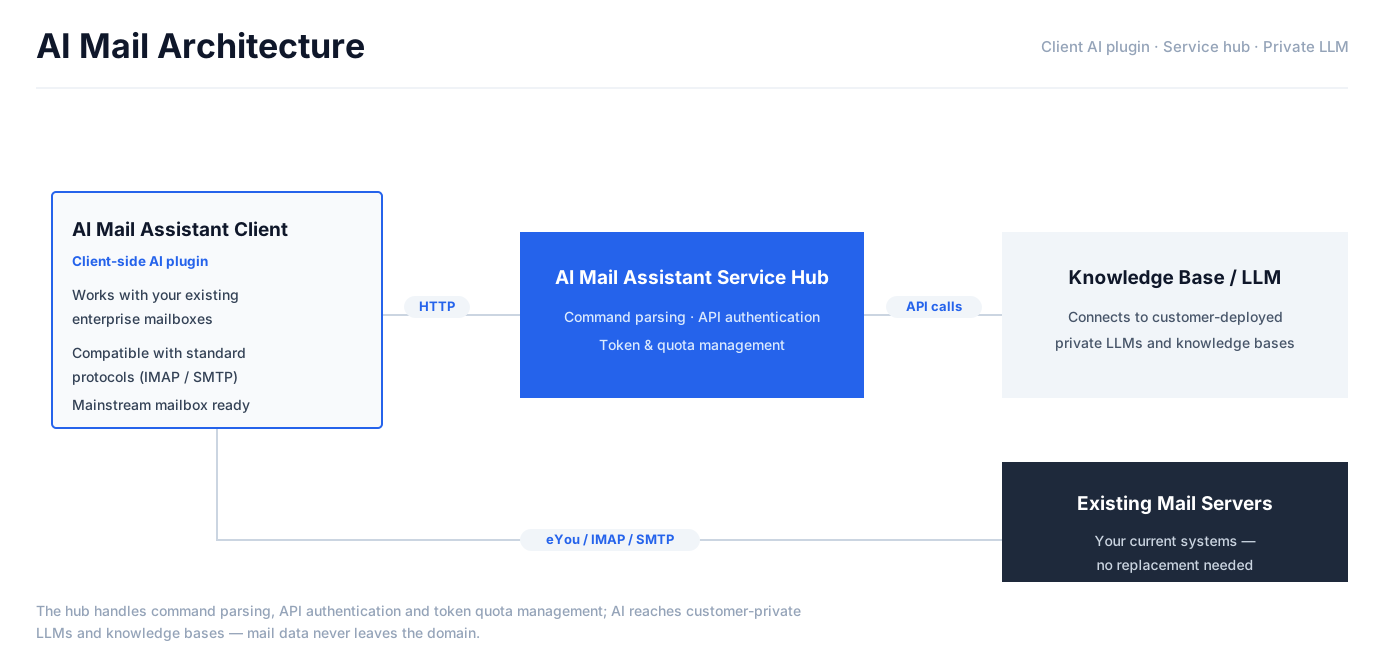
- Client side (SJ-Mail): mail and credentials are encrypted on each device; AI drafting, summary and translation requests point at the internal gateway, and sensitive actions (send, delete) are always user-confirmed.
- Server side (sj-ai-server hub): the self-developed hub handles command parsing, API authentication and token quota management, plus key lifecycle, quotas, auditing and IP black/white lists — routing model requests to the upstream your company chooses, public or self-hosted.
Rollout steps
- Deploy the sj-ai-server gateway inside the intranet as the single entry for AI requests.
- Point the model upstream at your own LLM via the OpenAI-compatible interface (model and parameters are managed server-side; clients are unaffected); a corporate knowledge base can be attached as well.
- Onboard employees through the web account center (verification-code self sign-up; one key per device, revocable remotely).
- Employees enter the gateway address and key in SJ-Mail and AI is live; on the mail side choose IMAP/SMTP or eYou CAPI — the existing mail system and servers are never touched.
Enterprise capabilities
- Dual protocol: standard IMAP/SMTP and eYou CAPI (central-SOE mail), with domain pre-recognition and account-level self-signed certificates since v0.7.0.
- AI governance: key lifecycle management, per-user/group quotas, full call auditing, IP black/white lists.
- Org-aware profiles: contact profiles incorporate the corporate directory, so AI understands people in context.
- VIP contacts + pre-send checks: spelling, attachment and sensitive-info gates for mail to executives and customers (warn or block).
- MCP agent access: employees can also use WorkBuddy-class agents over local MCP, with human-confirmed sending.
- System-level credential custody: account passwords, OAuth tokens, CAPI credentials and AI keys all live in the OS credential manager (Windows Credential Manager / macOS Keychain / Kylin secret-service) — zero credential plaintext in the local database, wiped the moment an account is removed (since v0.9.3). Compliance-audit ready; AES-256-GCM fallback with a persistent warning when the system key service is unavailable.
- Enterprise contacts sync (Sinopec pattern): deep adaptation for Sinopec-class central-SOE eyou environments — org contacts via the eyou jsonapi online directory plus full two-way personal CardDAV sync, local edits merged back with unmapped properties preserved (since v0.9.7).
FAQ
FAQ
Q: What does the SJ-Mail on-premise deployment include?
A: Two parts: on the client side SJ-Mail stores mail and credentials locally, encrypted; on the server side sj-ai-server acts as the AI gateway managing API keys, quotas, auditing and security policy, and routing to the model upstream. The whole stack runs inside the enterprise intranet — data never leaves.
Q: Can we use our own LLM after deploying on-premise?
A: Yes. Model routing in sj-ai-server is server-configured: any OpenAI-compatible upstream can point at your self-hosted or private model, with no client changes.
Q: Does SJ-Mail still work without an AI key?
A: Yes. SJ-Mail follows progressive enhancement: without AI it is a complete local mail client (send/receive, search, filters, contacts, calendar); connecting the AI gateway unlocks the AI layer.
Q: Which enterprise mail protocols are supported?
A: Both standard IMAP/SMTP and the eYou CAPI protocol for central-SOE mail systems, with built-in domain pre-recognition; contact profiles can incorporate the corporate org structure.