 SJ-MailShujian AI
How do I connect WorkBuddy to my mailbox? SJ-Mail MCP agent setup guide
SJ-Mail v0.9.0+ ships a built-in stdio MCP process. Three steps in WorkBuddy, and AI can draft but never send without you.
Symptoms
You want WorkBuddy to work directly with the mail in SJ-Mail (browse folders, read messages, search contacts, draft replies) but are not sure how to configure the MCP connector — or you worry the AI might send mail on its own.
Cause / background
Since v0.9.0 SJ-Mail ships a separate sj-mail-mcp process that exposes standard MCP over stdio (tool listing, mail read/write, search) and shares the same locally encrypted data as the main app. On the WorkBuddy side you register it as a custom connector — no config files to edit.
Setup steps
- Install an MCP-enabled SJ-Mail build (v0.9.0+;
sj-mail-mcp.exesits next to the main executable). - In SJ-Mail open Settings → General → MCP access level → choose "External" (persisted, survives restarts).
- In WorkBuddy open the left navigation "Connectors" → "Custom connector" and follow the wizard, pointing the command at
sj-mail-mcp.exe(e.g.C:\Users\<you>\AppData\Local\Programs\SJ-Mail\sj-mail-mcp.exe). - After approving the connector, WorkBuddy can use the SJ-Mail mail tools (list / search / read body / attachments / drafting). The result looks like this:
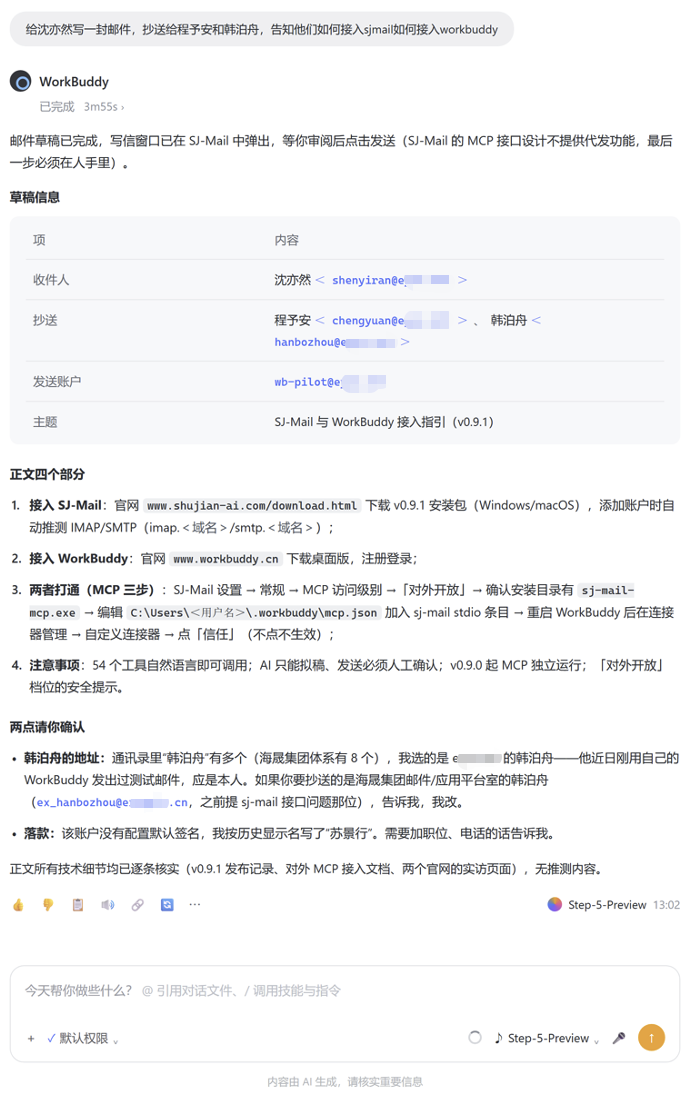
Send safety: AI drafts, you send
- Silent send is double-blocked: no send tool exists in the external tool list; drafts always open in the compose window for you to click Send.
- Drafts stay editable: the AI can set body/recipients; an open compose window refreshes live with the AI's edits.
- Single window path: even calling the send semantics directly only opens the compose window for confirmation.
FAQ
Q: Does the MCP integration require SJ-Mail to keep running?
A: No. sj-mail-mcp runs independently; reads (search, read, list) go straight to the shared local data. Only window-bound writes auto-launch SJ-Mail on demand, with up to 30 seconds cold start.
Q: Can the AI send email by itself once connected?
A: No — that is a hard rule. No silent-send tool exists in the external tool list; AI drafts always open the compose window and you click Send. The AI can still edit body and recipients normally.
Q: What are the security boundaries of the "External" access level?
A: With External, any local process that can start sj-mail-mcp can read and write the mail data (local database plus its own IMAP/CAPI connections). Enable it only on trusted machines; the three levels are off / internal (default) / external.
Q: Can MCP read the body of emails that are not cached locally?
A: Yes. Standard chain: list_emails to locate the message → read_email_body prompts fetch_email_body when the body is not cached → fetch_email_body pulls the full RFC822 and caches it, then retry the read. list_attachments uses the returned mail id.